Introduction
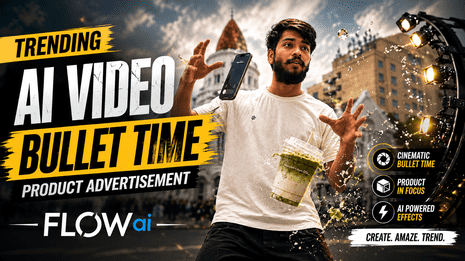
Hello friends! Trending ai video Bullet time product advertisement. Today I’ve brought a video for you that is currently trending a lot on social media. In this video, I’m going to explain how you can create this type of cinematic AI video easily and also understand all the important details behind it.In the video, a boy is shown walking while talking on his phone. He is holding a notebook in one hand and wearing glasses. As he keeps walking, the phone, notebook, and glasses suddenly appear to float away from him. At the same time, the coffee in his hand also starts falling in a dramatic slow-motion style, making the whole scene look even more realistic and eye-catching.The video has a very classic, stylish, and cinematic feel. So below, I’ll explain step by step how you can create this trending AI video easily.
What is a Bullet Time Product Advertisement?
Bullet Time Product Advertisement is a creative and cinematic type of advertisement through which we can showcase almost anything in a very attractive way. The camera appears to move around the product, and the item we are holding in our hands is also shown in a very classic and detailed way from close-up angles.The video looks very smooth and slow-motion, and different angles can be used to make the product look more attractive. For example, if we create an advertisement for a coffee, pair of glasses, or phone, we can use slow motion and different camera angles to give it a premium look.It feels like we are promoting a professional advertisement, and the video looks very attractive and premium. Nowadays, this type of video is becoming very popular and viral. With the help of AI, we can create a similar bullet-time effect without needing a big team or expensive camera setup.
Today, I am going to tell you how to create this type of video very easily. So, listen carefully and follow my steps.
How to Create a Bullet Time Advertisement Using AI?
Making a Bullet Time Product Advertisement is very easy, so you do not need any editing or an expensive camera. You can make it very easily. You just need to use some things, such as glasses, a photo of a coffee, and a phone. After this, you can use an AI image or video generation tool. Use a prompt for me in which the camera is shown moving around the product with slow motion and cinematic effects.You can turn your product into different -up, 360-degree camera movement, and picture-like effects. You can also add your favorite music. Finally, you can do a little editing yourself, so that your video can get a professional advertisement-like look according to you.
What is Google flow ai?
Google Flow is an AI-powered creative and filmmaking platform developed by Google Labs. It was originally introduced for generating cinematic videos using Google’s AI models such as Veo, Imagen and Gemini, and has since expanded into a broader creative studio for generating and editing images and videos. Creators can describe a scene through prompts, control shots and camera movements, maintain characters across scenes, and turn creative ideas into polished visual content.
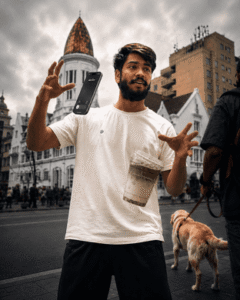
The given image represents the kind of imaginative content that AI tools like Flow can help create: a realistic street scene where a person appears to magically control a floating smartphone and drink. Such concepts would normally require careful filming or visual effects, but generative AI can make experimenting with unusual scenes much faster and easier.
How to use Google Flow Ai?
So Friends, if you also want to create a new trending Sugar Video with Google Flow AI, then I am telling you everything step by step. You just have to follow it correctly step by step.
- Step 1. First of all, copy the prompt given above.
- Step 2. After that, click on the video button given below. Or search for Google Flow AI in the Chrome browser on your phone.
- Step 3. After that, sign up for Google Flow AI with your Gmail.
- Step 4. After logging in with Gmail, click on New Project, then click on the plus ️ icon below and paste the prompt.
- Step 5. After that, do some settings. Click on what is written on the right side of the same box and select the video option, 10 seconds, Omni Flash, and ratio according to your preference, and click on the Generate option.
- Step 6. After that, wait for a few seconds. Your video will also be ready, and you can download it.
Conclusion
Google Flow shows how AI is changing visual storytelling by allowing creators to transform simple ideas into realistic, cinematic scenes. The image demonstrates how ordinary environments can be combined with imaginative actions to create eye-catching social-media content. With newer Flow features supporting more precise editing and high-resolution exports, creators can increasingly use one workspace to experiment, refine and produce polished visual stories.