

iPhone 18 Pro AI Photo Editing : Nowadays, a new trend is going on social media featuring the new iPhone 18 Pro. Everyone is participating in this trend, and iPhone 18 Pro and Apple Store AI Photos also look quite attractive. In these photos, you can show yourself buying an iPhone inside a premium Apple Store, posing with your friends, or taking a selfie with your partner. This type of photo looks very good. The Amazing interior of the Apple Store, the beautiful design of the iPhone, the iPhone in hand, and natural expressions on the face make the photo even more professional.
In this post, I will tell you everything in detail about iPhone 18 Pro photos and prompts. I will also explain properly how to create this trending photo with the help of ChatGPT. For this, read this article completely and create your photo correctly.
What Are New Trending iPhone 18 Pro AI Photos?
iPhone 18 Pro AI Photos are creative pictures prepared with the help of artificial intelligence. In these photos, your picture can be shown in a new scene, such as standing inside an Apple Store and holding a new iPhone in your hand. You can create your photo in different styles, such as:
A photo of yourself alone with an iPhone inside an Apple Store, A photo of two friends together inside an Apple Store, A girl’s mirror selfie with an iPhone, A premium couple photo inside an Apple Store ,Posing with a shopping bag after purchasing an iPhone, A funny photo with a bandage near the stomach.
All these elements give the photo a great look and a luxurious feel.
Why Are New Apple Store AI Photos So Special?
The new iPhone 18 Pro is special because the modern and premium environment of the Apple Store gives these pictures a different look. This phone comes with high quality. Its price is so high that people think twice before buying it. The Apple logo and the large iPhone advertisement in the background give the photo the experience of a real store. Today, with the help of AI, we can easily create our photos with an iPhone, which gives a complete luxury feel. That is why people are creating these photos in large numbers.
iPhone 18 Pro AI Photo Prompts.
So friends, these photos are going very viral at this time. If you also want to create a new trending iPhone 18 Pro photo with a bandage, you can create your own photo too. You just need the right prompt and your information, with the help of which you can create this photo very easily. Below, I am giving you a simple image for creating the photo along with its prompt.

Scene: Two young Indian men are standing together outside a bright, modern Apple Store, posing confidently for the camera. The photo is captured in a full-body, vertical portrait composition.
Left Man: A slim young Indian man with short, neatly styled black hair, a light mustache and beard, and a natural, relaxed facial expression. He is wearing a red and black checkered shirt, open and tied at the waist, with light blue baggy jeans and white sneakers. He is holding a silver iPhone in his right hand near his chest and a white Apple shopping bag in his left hand. A white medical bandage is clearly visible on the lower right side of his abdomen, just above his jeans, as if he recently underwent abdominal surgery. Preserve his exact face, hairstyle, body proportions, and pose from the reference image.
Right Man: A young Indian man with thick, slightly messy black hair, a full beard and mustache, and round black sunglasses. He is wearing a blue and black checkered shirt, open and tied at the waist, with loose black jeans, white sneakers, and a black wristwatch. He is holding a dark-colored iPhone in his right hand near his chest and a white Apple shopping bag in his left hand. A white medical bandage is clearly visible on the lower left side of his abdomen, just above his jeans, as if he recently underwent abdominal surgery. Preserve his exact face, sunglasses, hairstyle, body proportions, and pose from the reference image.
Background: A modern Apple Store glass storefront with large glass windows, bright indoor ceiling lights, customers and Apple Store employees visible inside, and a large illuminated white Apple logo on the upper right side. On the left side, there is a large dark promotional billboard featuring an iPhone with a triple-camera system and the text “ iPhone 18 Pro Max” in white. Keep the billboard, iPhone advertisement, Apple logo, and store architecture in their exact positions.
Composition and Camera: Full-body shot, both men standing side by side, left man slightly forward and right man slightly behind, natural standing poses, realistic perspective, camera at approximately chest height, vertical 9:16 framing. Preserve the original positioning of their feet, hands, shopping bags, and bodies.
Lighting and Quality: Bright natural daylight mixed with warm indoor store lighting, soft realistic shadows, clear skin texture, accurate clothing details, professional photography, sharp focus, realistic colors, high dynamic range, and photorealistic 4K quality.
Strict Reference Preservation: Do not change the faces, hairstyles, expressions, clothing colors, poses, camera angle, background, store layout, billboard placement, Apple logo, shopping bags, or overall composition. Do not make the image darker. Do not add extra people in the foreground, extra limbs, distorted hands, or unwanted objects. The final result must look like the same original photograph, recreated with maximum visual accuracy.
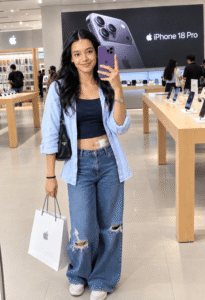
A young Indian woman is standing inside a bright, modern Apple Store, taking a mirror-style selfie while holding a purple iPhone in her right hand. She has long, wavy black hair, a natural smile, and a small bindi on her forehead. Preserve her exact face, hairstyle, expression, and body proportions from the reference image.
She is wearing a light blue oversized open shirt with rolled-up sleeves over a dark navy blue crop top, paired with loose-fitting blue ripped jeans and white sneakers. A black shoulder bag hangs from her left shoulder, and she is wearing a silver wristwatch on her right wrist and a black bracelet on her left wrist. A white medical bandage is clearly visible on the lower right side of her abdomen, just above her jeans, as if she recently underwent abdominal surgery. Preserve the bandage’s position and appearance exactly as shown.
She is holding a white Apple shopping bag in her left hand, with the Apple logo visible on the front. Her pose is relaxed and natural, with her right hand raised holding the purple iPhone near her face and her left arm hanging down holding the shopping bag.
Background: A bright, spacious Apple Store interior with wooden display tables, iPhones and other Apple products arranged on the tables, customers and store employees in the background, glass storefront elements, and warm ceiling lights. A large black promotional billboard is visible behind her, featuring a purple iPhone with a triple-camera system and the text “ iPhone 18 Pro” in white. Keep the billboard, Apple logo, store furniture, and background elements in their original positions.
Camera and Composition: Full-body vertical portrait, 9:16 aspect ratio, eye-level camera perspective, centered subject, natural standing pose, and the same framing as the reference image. Preserve the exact positioning of her feet, hands, phone, shopping bag, and body.
Lighting and Quality: Bright, soft, natural-looking indoor lighting, realistic skin texture, accurate clothing details, clear focus, professional photography, high dynamic range, photorealistic 4K quality. Do not make the image dark.
Strict Reference Preservation: Do not change the woman’s face, hairstyle, expression, outfit colors, accessories, pose, camera angle, background, Apple Store layout, billboard, or overall composition. Do not add extra people in the foreground, extra limbs, distorted hands, or unwanted objects. The final image must look like the same original photograph recreated with maximum visual accuracy.

Scene: A young Indian man and woman are standing closely together inside a bright, modern Apple Store, posing confidently for the camera. The man is on the left and the woman is on the right. Capture the same full-body vertical composition as the reference.
Left Man: A young Indian man with thick, slightly messy black hair, a full beard and mustache, and round black sunglasses. He is wearing a black oversized T-shirt with the white text “ANTISOCIAL” on the front, a black printed bandana around his neck, and loose black cargo pants. He is holding a silver iPhone in his right hand and a white Apple shopping bag in his left hand. His black T-shirt is lifted slightly at the front, revealing his abdomen with a large, clearly visible white medical bandage covering the lower abdominal area, as if he recently underwent abdominal surgery. Preserve the exact bandage placement, size, and appearance from the reference.
Right Woman: A young Indian woman with long, wavy black hair, a small bindi, a delicate forehead ornament, and a gentle natural smile. She is wearing a white cropped T-shirt with navy blue trim and the printed text “GEORGIA 67” on the front, paired with white drawstring shorts and white sneakers with white socks. She is holding a purple iPhone in her right hand and a white Apple shopping bag in her left hand. A large, clearly visible white medical bandage is placed across the lower abdomen, above the shorts, as if she recently underwent abdominal surgery. A small medical patch is also visible on her upper thigh. Preserve the exact bandage placement and appearance.
Pose and Composition: The man stands slightly behind and to the left of the woman, with their shoulders close together. Both are looking directly at the camera. The man holds his iPhone near his chest, while the woman raises her purple iPhone near her face. Both hold white Apple shopping bags down by their sides. Preserve the exact hand positions, body posture, leg positioning, facial expressions, and overall framing from the reference image.
Background: A spacious, brightly lit Apple Store interior with wooden display tables, iPhones and Apple products arranged on the tables, customers and employees in the background, and a large illuminated Apple logo on the upper left wall. Behind the subjects, a large black promotional billboard displays a bronze/gold iPhone with a triple-camera system and the text “ iPhone 18 Pro” in white. Keep the billboard, Apple logo, store furniture, and background layout in their exact positions.
Camera and Lighting: Full-body vertical portrait, 9:16 aspect ratio, eye-level camera perspective, natural standing pose, realistic depth of field, bright indoor lighting, soft shadows, accurate skin tones, and professional photography quality. Keep the image bright and clear; do not make it dark.
Strict Reference Preservation: Do not change the faces, hairstyles, expressions, clothing colors, printed text, accessories, poses, camera angle, background, Apple Store layout, billboard, shopping bags, or overall composition. Do not add extra people in the foreground, extra limbs, distorted hands, or unwanted objects. The final result must look like the same original photograph recreated with maximum visual accuracy.
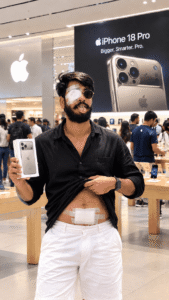
Main Subject: A young Indian man with thick, slightly messy black hair, a full beard and mustache, and round black sunglasses. He is standing inside a bright, modern Apple Store, posing confidently for the camera with his tongue slightly sticking out. Preserve his exact face, hairstyle, beard, mustache, sunglasses, and facial expression from the reference image.
Outfit: He is wearing a black full-sleeve button-up shirt with a chest pocket, slightly open at the top. He is lifting the lower front of his shirt with his right hand, revealing his abdomen. He is wearing loose white shorts and a black smartwatch on his left wrist. Preserve the exact clothing, colors, folds, and accessories.
Medical Bandages: A large, clearly visible white surgical bandage is placed horizontally across the lower abdomen, just above the waistband of his white shorts, as if he recently underwent abdominal surgery. The bandage consists of layered white medical gauze and adhesive strips, matching the reference image exactly in size, position, and appearance. A large white medical eye patch is also covering his left eye, secured with multiple white adhesive strips. Preserve both bandages accurately without making them smaller or changing their placement.
Pose and Props: He is holding a white iPhone 18 Pro retail box in his left hand, with the phone image and Apple branding visible on the front. His right hand is lifting his black shirt to reveal the abdominal bandage. His body is facing the camera, with a relaxed and confident standing posture. Preserve the exact positioning of his hands, phone box, shirt, and body.
Background: A spacious, brightly illuminated Apple Store interior with wooden display tables showcasing iPhones, customers and employees in the background, and a large illuminated white Apple logo on the left wall. Behind the subject, a large black promotional billboard displays a bronze/gold iPhone with a triple-camera system and the text “ iPhone 18 Pro” and “Bigger. Smarter. Pro.” in white. Keep the billboard, Apple logo, store furniture, and background layout in their exact positions.
Camera and Composition: Vertical 9:16 portrait photograph, medium-full body framing, camera at approximately chest height, subject centered in the frame, natural perspective, and the same crop as the reference image. Preserve the original positioning of the subject, hands, phone box, and background elements.
Lighting and Quality: Bright, warm indoor Apple Store lighting mixed with natural ambient light, realistic skin texture, sharp details, accurate colors, soft shadows, professional photography, high dynamic range, and photorealistic 4K quality. Do not make the image dark.
Strict Reference Preservation: Do not change the man’s face, hairstyle, beard, mustache, sunglasses, facial expression, outfit, accessories, bandages, pose, camera angle, background, Apple Store layout, billboard, or overall composition. Do not add extra people in the foreground, extra limbs, distorted hands, or unwanted objects. The final result must look like the same original photograph recreated with maximum visual accuracy.
How to Create Your Own iPhone 18 Pro AI Photo with ChatGPT?
You can create an iPhone 18 Pro photo with a bandage very easily. You just need to follow a few simple steps, such as:
1. First, copy the prompt given above.
2. After that, click on the button given below.
3. After clicking, you will reach ChatGPT. Log in using your Gmail account.
4. After that, click on the + icon and upload your own photo or your friend’s photo as a reference image, whoever’s photo you want to create.
5. After uploading the photo, paste the copied prompt into the same empty space and click on the Generate button.
6. After clicking Generate, wait for some time. Your photo will be created and ready, and you can save it.
How to Make an iPhone 18 Pro AI Photo More Realistic?
If you want your AI Photo to look exactly like a picture taken with a real camera, keep these things in mind.
First, whichever photo you are using as a reference should be an original photo, not an AI-generated one. The photo should be in high quality. Try to use a half-body photo. Do not change too many things in the prompt. If you like bright photos, write instructions such as “bright natural lighting” and “do not darken the image” in the prompt. Also, write in the prompt that the facial identity, hairstyle, and facial features should not be changed at all. However, AI does not guarantee complete similarity every time.
Medical Bandage Concept in AI Photos.
The photo prompt given above also includes the concept of a white medical bandage on the stomach. This is a non-graphic creative photo element that can be used to give the photo a different story or visual theme.
Keep in mind that an AI-generated photo with a medical bandage is not proof of any real operation, injury, or medical condition. These photos are created just for fun.
FAQ.
1. How to Create an iPhone 18 Pro AI Photo?
You can try creating an Apple Store AI Photo by uploading your photo to an AI image tool such as ChatGPT and using a clear prompt.
2. Can We Keep Our Own Face in an AI Photo?
Yes, you can keep your real face while creating an AI photo.
3. Can We Change the Apple Store Background in an AI Photo?
Yes, you can try creating a different scene for your photo by describing an Apple Store, shopping mall, or any other premium background in the AI prompt.
4. When Will the iPhone 18 Pro Launch?
The iPhone 18 Pro will launch on 18 September.
5. Can We Change the iPhone Color in an AI Photo?
Yes, you can try creating a creative concept according to your preference by specifying the phone’s color, design, or style in the prompt.
Conclusion
iPhone 18 Pro Trending AI Photo Editing is a creative way that allows you to try transforming your ordinary photo into a premium Apple Store photo. Whether you want to create a photo alone, pose with friends, or prepare a couple photo, the right reference photo and a good AI prompt can help turn your idea into a Amazing visual.
I have explained everything step by step to create this photo. You just need to follow it correctly, and your image will also be created.