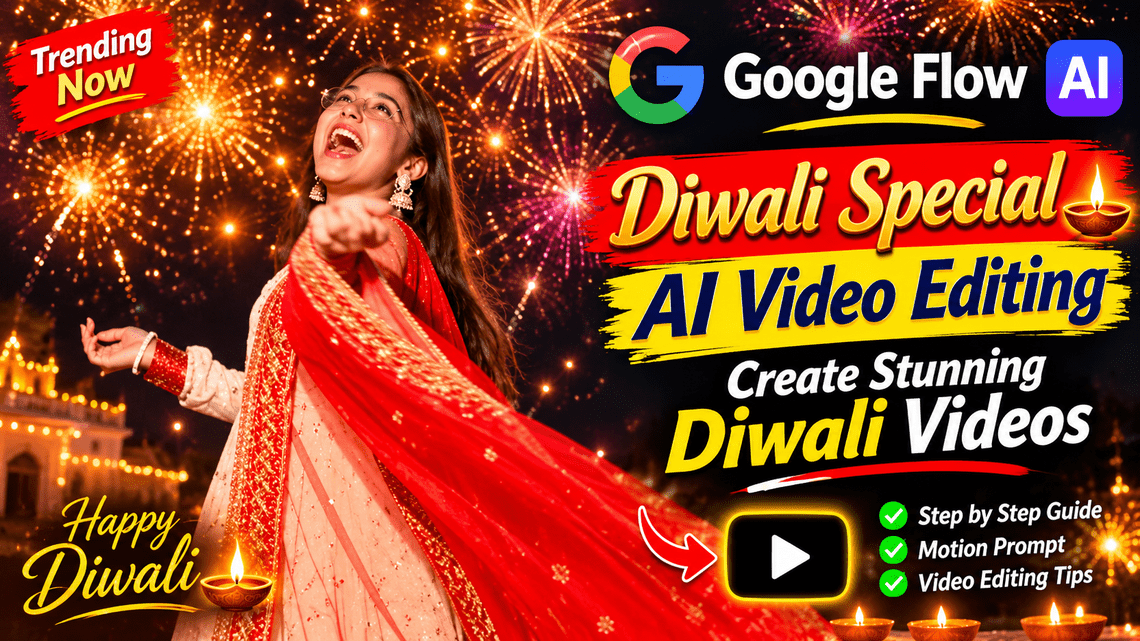
Diwali Special AI Video Editing –Hello friends! These days, this AI video is becoming very popular and trending on social media, and people are loving it. So, today I am going to show you how to create this amazing video.
In this video, you can see a girl wearing a beautiful traditional Ghagra Choli, gracefully dancing in circles. At the same time, colorful Diwali fireworks are bursting in the sky behind her. This is what makes the video so attractive and loved by everyone.
With the help of AI, you can easily transform an ordinary photo into a beautiful Diwali celebration video. In this type of video, a beautiful girl wearing a traditional outfit is shown. At the beginning, she poses gracefully under the open sky. After that, a stunning transition takes place, showing a beautiful nighttime scene. Colorful fireworks light up the sky, while the girl gracefully waves her red dupatta and enjoys the festive atmosphere of Diwali.
The most special things about this video are its cinematic look, stunning lighting, smooth transitions, and beautiful Diwali atmosphere, which make the entire video look absolutely amazing.
In this photo editing style, a boy and a girl are seen posing beautifully in a stunning city at night, surrounded by fireworks and sparkling lights.
In the first photo, the girl is wearing a black and white checkered shirt and blue jeans. Beautiful golden fireworks are lighting up the sky behind her, making the photo look even more attractive and cinematic.
In the second photo, the boy is wearing a black and white checkered shirt, blue jeans, and sunglasses. Behind him, spectacular golden fireworks and brightly illuminated city buildings can also be seen.
Both pictures showcase a beautiful combination of a night city background, golden lighting, and realistic fireworks.
What Is Diwali Special Fireworks Video Editing?
Diwali Special Fireworks Video Editing is a beautiful video editing style that uses visual effects and cinematic motion related to the Diwali festival.
The main attractions in this video are traditional Indian clothes, a red dupatta, a beautiful nighttime atmosphere, and sparkling fireworks in the sky.
With the help of AI Video Generation, a photo can be converted into a moving video.
Special Features of This Diwali AI Video?
Beautiful Traditional Indian Look :- In the video, the girl is wearing a beautiful peach-colored traditional outfit. Along with it, the red-colored dupatta makes her look even more attractive.
Beautiful Diwali Fireworks – The most special part of the video is the colorful fireworks visible in the sky. Golden and orange lights create an atmosphere similar to a Diwali celebration.
Cinematic Night Background- The beautiful night sky and the sparkling fireworks in it give the video a शानदार cinematic look.
Beautiful Red Dupatta- The red dupatta waving in the air makes the video even more beautiful. It gives the traditional Indian look a unique identity.
Diwali new trending girl and boy photo editing prompt?
This type of Diwali Special photo is going very viral. You can also create it in just a few seconds. For this, I am providing the photo along with its prompt below, which you can use.

Create an ultra-realistic, cinematic full-body Diwali night photograph using the uploaded reference image.
STRICT FACE IDENTITY LOCK: Preserve the exact facial identity, facial features, hairstyle, skin tone, and natural appearance of the person in the uploaded reference photo. Do not change, beautify, reshape, or replace the face. The person must look exactly like the original reference photo.
Subject & Outfit: A stylish young Indian man standing confidently on a modern city road at night. He has naturally thick, curly dark hair and wears black stylish sunglasses, a black-and-white checkered full-sleeve shirt with sleeves rolled up, light blue baggy jeans, white sneakers, a wristwatch, and a simple bracelet. One hand is casually placed inside his jeans pocket while the other hangs naturally. His body posture is relaxed and fashionable.
Diwali Fireworks: A large colorful ground fountain firework (anar) is placed on the road to the left side of the

IDENTITY LOCK: Preserve the person’s original face 100% identical to the uploaded reference image. Do not change facial structure, eyes, nose, lips, skin tone, or natural facial features. Maintain the exact identity and realistic appearance.
POSE & BODY POSITION: A young woman standing casually on a modern city road at night. Her head is slightly tilted towards her left side, looking down at the beautiful golden fireworks with a gentle, natural closed-mouth smile. Both hands are comfortably placed inside the front pockets of her jeans. Her legs are slightly crossed at the ankles, creating a relaxed and stylish standing pose. Full-body portrait.
HAIRSTYLE: Long black hair tied into a beautiful high ponytail with a few natural loose strands framing her face. Maintain realistic hair texture and natural appearance.
OUTFIT & ACCESSORIES: She is wearing an oversized black and white small-checkered button-up shirt with sleeves folded up to the elbows. The shirt is slightly loose and untucked. Paired with light blue wide-leg baggy denim jeans and clean white sneakers. A simple thin necklace, small black earrings, a stylish wristwatch on her left wrist, and a delicate bracelet.
BACKGROUND & ENVIRONMENT: A beautiful modern city street at night, surrounded by tall glass skyscrapers with glowing golden office lights. On the right side, a modern building displays the illuminated golden sign “THE ICONIC”. Beautiful streetlights, green roadside trees, and a clean urban road complete the background.
On the extreme left side of the image, a large golden fountain-style firework (Anar) is bursting upwards from the road, creating spectacular bright golden sparks, glowing particles, and thick realistic white smoke. The fireworks should be clearly visible and extend from the bottom to the upper left side of the frame.
LIGHTING & ATMOSPHERE: Warm golden fireworks illuminate the surroundings and naturally reflect on the woman’s face, shirt, and jeans. Realistic night photography with cinematic golden lighting, natural shadows, detailed smoke, and beautiful glowing sparks. Keep the face bright, clear, and naturally exposed.
CAMERA & COMPOSITION: Vertical 9:16 portrait photography, full-body framing from head to shoes. Place the woman slightly towards the center-right and the large golden fireworks on the left. Maintain the same camera angle, standing position, background arrangement, and overall composition as the reference image.
Ultra-realistic DSLR photography, sharp facial details, natural skin texture, professional cinematic color grading, 8K UHD quality.
IMPORTANT: No face modification, no hairstyle changes, no extra people, no additional objects, no cartoon effects, no artificial skin, no dark face, no watermark, no text overlays, and no screenshot interface.
Diwali Special AI Video Editing Prompt.
The prompt to create this trending video is given below. You can use it.

How to Convert Diwali AI Photo into a Video Using Google Flow AI?
To create a beautiful video like this, you will have to follow some simple steps. Below, I am explaining everything step by step. Just follow them.
Step 1. First, copy the prompt provided above.
Step 2. After that, click on the video button given below and log in to Google Flow AI.
Step 3. After logging in, select one of your photos.
Step 4. After selecting the photo, paste the given prompt into the empty space.
Step 5. Wait for some time, and your video will be ready. Then, download it.
How to Make Your Diwali Video More Attractive?
Before posting your video on social media, keep a few important things in mind.
● Always use high-quality photos.
● Write proper Motion Instructions in the AI Video Prompt.
● Keep natural and smooth movements in the video.
● Try to make the fireworks effects look realistic.
● Add good Diwali Background Music to the video.
● Avoid unnecessary transitions and effects.
FAQ.
1. What is Diwali Special AI Video Editing?
It is a way of creating beautiful videos with Diwali fireworks and festive backgrounds using AI and video editing tools.
2. How to Create a Diwali AI Video from Your Photo?
Upload your photo to an AI Image to Video tool and generate a video with the help of a Diwali Special Motion Prompt.
3. Which AI Tool Is Good for Creating Diwali AI Videos?
AI Video Generation tools such as Google Flow can be used.
4. How to Add Fireworks Effects to an AI Diwali Video?
You can give instructions for Realistic Fireworks in the AI Video Generation Prompt or use the available fireworks effects in your video editor.
5. What Is the Best Ratio for Diwali Videos on Instagram Reels?
You can use a 9:16 Ratio, which means a resolution of 1080 × 1920, for Instagram Reels.
Conclusion.
Diwali Special AI Fireworks Video Editing is a great creative idea for people who want to give their videos a new and attractive look this Diwali.
This video features a wonderful combination of a beautiful white traditional outfit, a red dupatta, a nighttime atmosphere, and colorful fireworks.
You can also create a video like this. I have explained everything in detail above. Follow the steps and create your own video. I hope your video will also be ready successfully. If your video is ready, you can upload it to any social media platform, get a lot of views, and go viral.