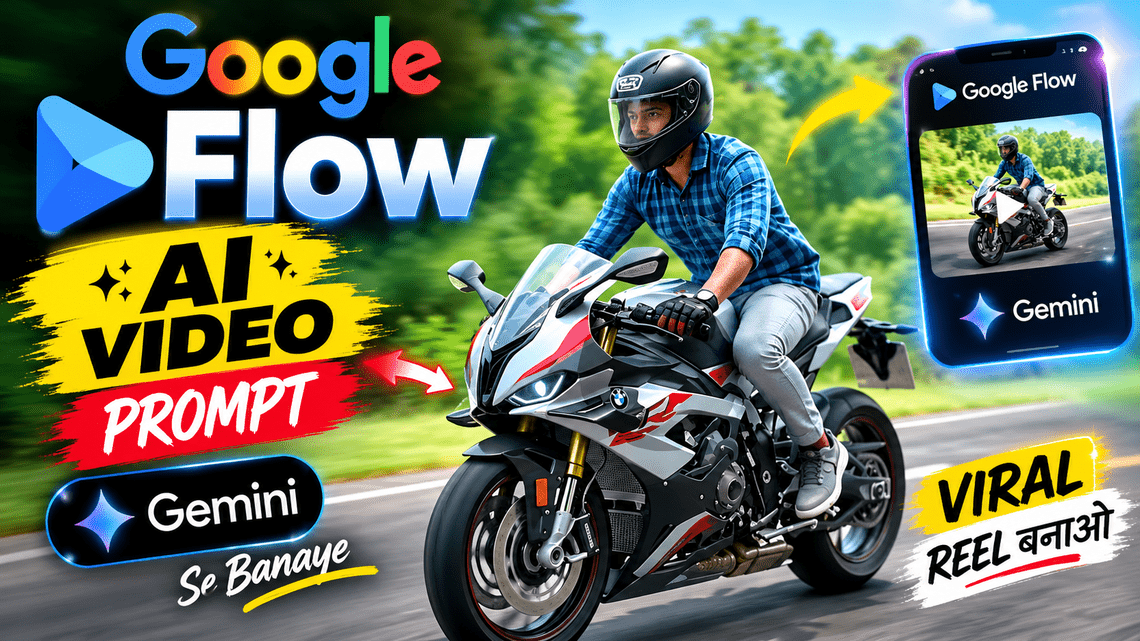
Miniature Bike to Real Motorcycle AI Video:- Hello friends, Today, I’m bringing you an amazing AI cinematic bike riding video editing tutorial that is currently trending. In this video, an ordinary small bike is shown near a train window, creating an illusion that the bike is moving along with the train. This makes the video look incredibly creative and cinematic.
The video shows the bike riding on open highways and passing through beautiful, illuminated tunnels and scenic roads. The bike’s lighting, smooth camera movements, and cinematic background make the entire video look stunning and realistic.
Today, I’ll teach you how to create this type of amazing video using an AI video generator. You don’t need an expensive camera or a professional crew to create it. All you need is a good reference image and the right AI prompt. So, let’s get started and learn how to create this trending AI cinematic bike riding video step by step.
What Is Cinematic Bike Riding Video?
Cinematic bike riding video editing is an amazing technique that helps transform ordinary bike videos into stunning visuals that look like scenes from a movie or a professional bike advertisement. It uses natural bike movements, impressive lighting, smooth camera angles, motion blur, and beautiful backgrounds to make videos look more realistic and cinematic. With the help of AI tools, you can create amazing bike riding videos on highways, inside tunnels, in the mountains, and on city streets glowing at night. These videos are perfect for sharing on Instagram Reels, YouTube Shorts, and other social media platforms.
Miniature Bike to Real Motorcycle AI Video Prompt.
Copy the complete prompt below and use it to generate your video.
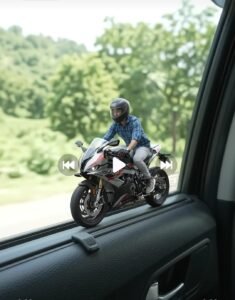
Scene 1 – Miniature Motorcycle on Car Window: A tiny miniature, cartoon-like sports motorcycle with a young male rider is moving along the narrow inner window ledge of a moving car. The miniature bike has realistic details, black wheels, red accents and a tiny rider wearing a blue checkered shirt, light grey trousers and a black helmet. The camera captures the miniature motorcycle from outside the car window. Beautiful green trees and hills pass in the background with natural motion blur. The car window frame and window ledge remain clearly visible.
Scene 2 – Magical Transition: The tiny motorcycle and rider gradually transition into a full-size realistic sports motorcycle and a real human rider, maintaining exactly the same clothing, helmet and motorcycle design.
Scene 3 – Night Highway: The full-size motorcycle is now riding on a real highway at night. Show the rider from a side and slightly rear angle. The motorcycle’s red tail light glows naturally. The road, surrounding darkness and distant lights create a cinematic atmosphere.
Scene 4 – Tunnel Ride: The rider continues smoothly through a modern illuminated highway tunnel. Warm tunnel ceiling lights reflect naturally on the motorcycle and road. The camera follows the motorcycle from the side.
Scene 5 – City Highway: The motorcycle exits the tunnel and continues riding on a beautiful illuminated city highway at night. Distant city lights and buildings are visible.
Important Requirements:
- First scene must show a tiny miniature/cartoon-like bike on the car window ledge.
- Do not show a full-size motorcycle in the first scene.
- Transition from miniature bike to real motorcycle.
- Keep rider clothing, helmet and bike design consistent.
- Smooth cinematic transitions.
- Realistic movement and lighting.
- No text, subtitles or watermark.
- Match the original reference video’s sequence and camera angles as closely as possible.
- 16:9, 8K UHD quality.
How to Create an AI bike riding Video?
Follow these easy steps to create your own AI bike riding Video. You only need a clear photo of your bike and the prompt given in this post.
Step 1. First, take a clear photo of your hand and wrist using your mobile phone.
Step 2. Now, copy the AI bike riding Video prompt given below in this article.
Step 3. Scroll down and click on the Create Your Video button to open Google Flow.
Step 4. After opening Google Flow, click on New Project and choose a video model.
Step 5. Upload your hand photo and paste the copied prompt into the prompt box.
Step 6. If you see the video duration option, select 10 seconds. Then click on Generate to create your video.
Step 7. Wait a bike riding for your video to be ready. Once it is complete, watch it and download it to your phone.
Features of This AI Video Effect?
This video makes the hand and palm look like a real camera photo. Glowing orange veins appear on the wrist and palm, with light slowly moving through them. The camera then zooms into the glowing veins, creating a stunning visual effect. At the end, small glowing particles make the video look even more attractive. The orange and amber lighting gives the video a unique and cinematic look. This video can be created in a 9:16 vertical format, making it perfect for sharing on Instagram Reels and YouTube Shorts.
Key Features of This Video?
A stunning sports bike with a realistic design, detailed wheels and lights, smooth cinematic camera movements, beautiful highways, tunnels, and city lights, bright headlights and glowing red taillights, natural shadows, road light reflections, and impressive motion blur combine to give the video a professional, attractive, and realistic cinematic look.
Essential Tips for Getting Amazing Results?
Always use a clear, high-quality reference photo and clearly describe the movements of the bike and rider in your prompt. Try to maintain a consistent look for the bike and rider throughout the video, and avoid using too many visual effects. Choose suitable background music and sound effects to improve the video quality. After generating the video, carefully check the bike’s wheels, the rider’s hands, and the background to ensure everything looks realistic. When uploading the video to social media, always use music that you have permission to use.
FAQ.
1. Which AI tool can create a miniature bike transformation video?
You can try Google Flow AI, Gemini AI and other compatible AI video generation tools
2. Can I create this video using Google Flow AI?
Yes, you can use the prompt with Google Flow AI to generate a similar miniature-to-real motorcycle transformation video.
3. Is this AI video prompt free to use?
The prompt provided in this article is free to copy and use. However, the AI video generation tool may have its own usage limits or paid plans.
Conclusion.
AI cinematic bike riding video editing is an easy and creative way to create amazing and professional-looking bike videos. With its help, you can try to create attractive videos without expensive cameras or a large setup.
All you need is a good reference photo, the right AI prompt, and a little video editing. For the best results, carefully follow all the steps provided in this article. Use Google Flow AI to experiment with different backgrounds, camera movements, and lighting effects, and create your own amazing cinematic bike riding videos.