Trending Moonlight Night AI Video A-: Nowadays, AI photo editing and AI photo-to-video effects are becoming quite popular on social media. In this trend, portrait photos with a full moon, cloudy night sky, and rooftop background, along with traditional outfits, are giving an attractive look on social media. In this post, you will get information about this style of Trending Moon Night AI video, along with an AI prompt to generate this type of image. This video looks very good to watch because it is a couple video. Both boys and girls can create this video.Everything is given below step by step.
Trending Moon Night AI Photo and Video: What Is It?
Trending Moon Night AI Photo is a cinematic-style AI image-to-video concept in which a beautiful night environment is combined with portrait photography. Couples can create these videos who miss their love partner very much. Both boys and girls can create this video.
In this video, some elements such as Bright full moon, Cloudy night sky, Rooftop or terrace background, Soft moonlight, Traditional outfit, Cinematic night atmosphere, and Realistic portrait look have been added, which make this video look very good.
Moon Night AI Photo and Video Look.
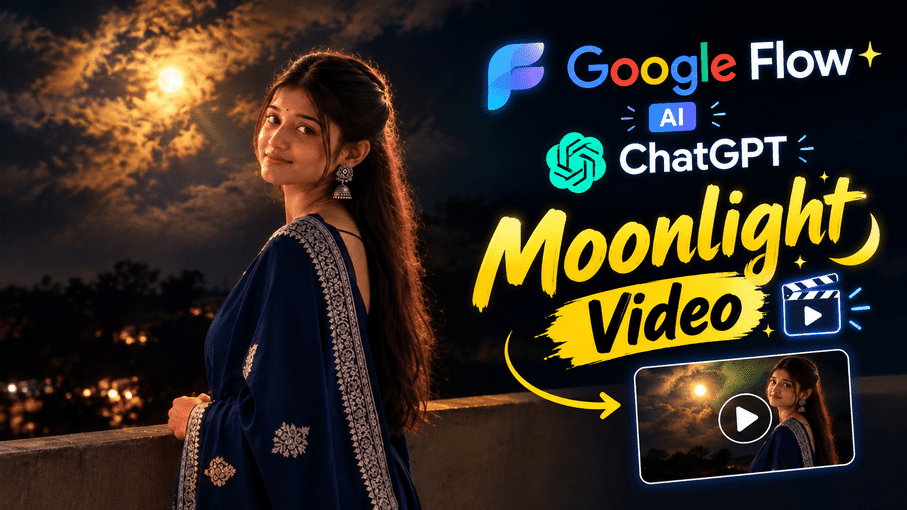
The most special thing about the trend is its natural cinematic night atmosphere. In the background, a bright moon can be seen between the dark sky and clouds, while soft light falls on the subject.
In the portrait image shown in the video, the girl can be seen standing on a rooftop. She is wearing a dark-blue traditional outfit, and a peaceful night atmosphere can be seen in the background.
AI Moon Night Photo and Video Prompt.
If you also want to create a video from an AI photo based on this concept, you can use the prompt given below.
Video photo prompt

Photo Editing prompt
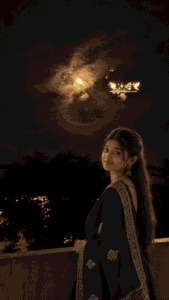
A young Indian woman is standing on a rooftop terrace at night, positioned on the right side of the frame, shown from approximately waist-up/full-body side angle. She is slightly turned away from the camera while looking back toward the camera with a soft, natural and gentle smile. PRESERVE THE WOMAN’S FACE EXACTLY AS IN THE REFERENCE IMAGE. Do not change her facial identity, facial structure, eyes, eyebrows, nose, lips, skin tone, expression, hairstyle, hairline, or proportions. Keep her natural realistic appearance. She has long dark brown/black hair tied into a neat high ponytail, with a few natural strands framing her face. She is wearing elegant traditional Indian clothing: a deep navy-blue saree with intricate silver/white embroidered borders and matching floral embroidery. She is wearing traditional silver jhumka earrings and a small black bindi. The scene is set on a rooftop terrace at night. In the background there are dark silhouettes of trees and distant warm yellow-orange lights from buildings/houses. A concrete rooftop parapet wall is visible in the foreground and lower part of the image. The sky occupies most of the upper frame and is very dark with dramatic natural clouds. A bright warm full moon is visible slightly left of center, partially surrounded by glowing clouds, creating a beautiful golden moonlight atmosphere. The moonlight softly illuminates the clouds and creates subtle warm rim lighting around the woman’s hair and shoulders. Above and slightly behind the woman, include a small decorative glowing music-themed graphic floating in the sky: tiny musical notes, a glowing audio waveform/equalizer, sparkles, small glowing flowers/leaves and a small orange/yellow emoji-like decorative element. Keep this graphic subtle and naturally integrated into the scene. Composition must match the reference image: vertical portrait orientation, woman on the lower-right side, large dark cloudy sky occupying the upper portion, moon on the upper-left/middle area, rooftop and trees along the bottom, and decorative music graphic above the woman. Lighting: realistic low-light night photography, warm moonlight, subtle golden highlights, natural shadows, soft cinematic glow, realistic skin texture, realistic fabric texture, gentle rim light around hair. Camera: realistic smartphone/DSLR photography, vertical 9:16 composition, natural perspective, sharp subject, detailed face, realistic depth of field. Color grading: dark navy night sky, warm golden moonlight, subtle orange city lights, natural skin tones, cinematic but realistic. Ultra-realistic, photorealistic, highly detailed, 8K UHD, natural skin texture, realistic hair strands, realistic saree embroidery, professional night photography. DO NOT change the composition, camera angle, woman’s position, pose, facial identity, hairstyle, saree design, colors, moon position, cloud formation, background arrangement, lighting mood, or decorative music graphic. Recreate the reference image as closely and accurately as possible.
How to Create This Moon Night Photo and Video.
Friends, today I am telling you step by step how to make this video. You just have to follow a few simple steps, and your video will also be created.
How to Use ChatGPT.
Step 1. First, copy the photo prompt from the two prompts given above.
Step 2 . After that, click on the image created button given above. And sign up for ChatGPT with Gmail.
Step 3. After logging in, click on the + icon and select any one of your photos, then paste the copied prompt into the empty space. After that, click on generate.
Step 4 . After generating, wait for a few seconds and your image will be created. Save the image you have created.
How to Use Google Flow AI.
So friends, let me tell you how you will create the video.
. First, copy the video prompt.
. After copying, click on the video button given above.
. After clicking, you will reach Google Flow AI. Sign up with your Gmail.
. After logging in, click on the + button and upload the image you created.
. After uploading the photo, paste the copied prompt into the same empty space and click on the generate button.
. After that, wait for a few seconds and your video will also be ready. Download it.
Things to Keep in Mind While Creating an AI Photo.
If you are creating a photo with AI, keep a few things in mind. The photo you are selecting should be in high quality, the face should be clearly visible, do not use an AI-generated photo, and choose a photo that is completely clear. Follow all these things properly so that your image will be created correctly and you will be able to make it properly into a video.
FAQ.
1. What is Moon Night AI Photo and Video?
Moon Night AI Photo and Video is an AI-generated cinematic portrait concept in which a full moon, night sky, clouds, and portrait subject are combined to create a look similar to realistic night photography.
2. Can I create a Moon Night AI Photo using my own photo?
Yes, you can use your own photo as a reference and generate an AI image based on this concept.
3. Can the face be kept the same?
Instructions to preserve facial identity and original facial features can be given in the AI prompt. The result will depend on the AI tool and the quality of the reference image.
4. What is the best format for AI Moon Night Photo and Video?
For Instagram Reels and Shorts, the 9:16 vertical format is useful, while a square or portrait format can be used for a normal Instagram post.
5. How can I add a zoom effect to an AI photo video?
Instructions such as slow cinematic push-in or slow zoom-in followed by a gentle pull-back can be given in the prompt.
Conclusion.
Trending Moon Night AI Photo and Video is a beautiful cinematic portrait concept in which moonlight, cloudy night sky, rooftop, and traditional Indian fashion have been combined. This type of AI photography can give a normal portrait a completely different cinematic atmosphere.
With the help of the prompt given above, you can create a full moon night portrait like this and share it on Instagram, Facebook, YouTube Shorts, or WhatsApp Status. If you like AI photo editing and trending AI image prompts, check out more posts on VishalEdits.com for new AI photo ideas and prompts.